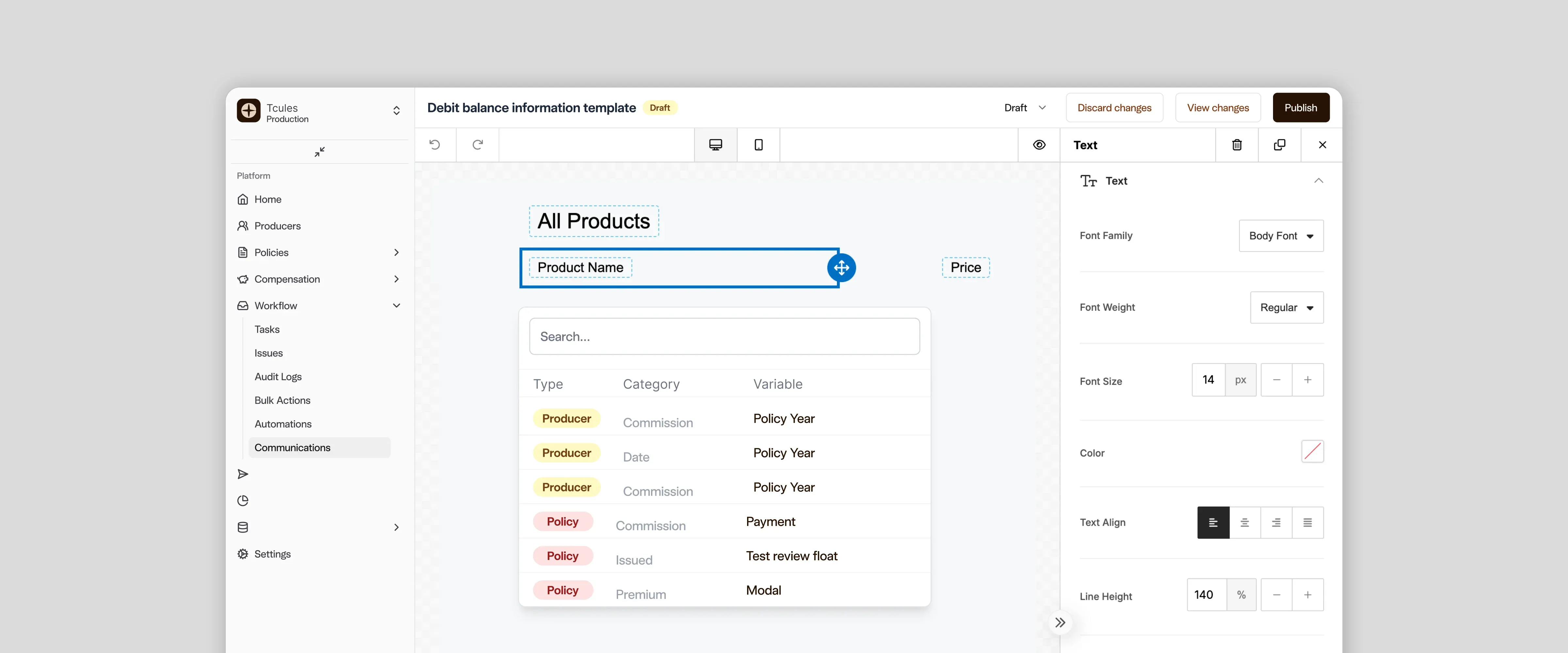
Template editor with the variable picker open, showing producer and policy details

Chestnut

Showing How Far One Action Reaches

COMPANY

Chestnut

SECTOR

Insurance technology

THE WORK

Embedded product design and front-end build for communications, bonuses and holds

Problem

Insurance carriers use Chestnut to pay their producers, the agents who sell their policies, and to keep them informed. In a platform like this, one action can reach much further than it looks. An email edit can change several automated workflows at once, a payout can move after a policy update, and a hold can stop money a producer is expecting. The interface had to show those consequences while people could still act on them.

Solution

We worked inside Chestnut’s product and codebase to make each consequence visible at the moment of decision. That meant showing which workflows a template change will reach, whether a payout is final, and what a release estimate leaves out.

01 / THE SITUATION

Design inside a product that was already moving

Chestnut is a producer performance platform for the insurance industry. Its customers are insurance carriers, and each one configures the platform for its own network of producers. That covers commission schedules, bonus programmes, hierarchies, holds on earnings, and the compliant email that goes out around all of it. Much of the product is arithmetic, and the correct number is often expensive to work out.

Tcules worked as an embedded design partner for about thirteen months, alongside Chestnut’s own product, design and engineering teams. The product was already live and evolving, so we worked from the running application, the codebase and the product specs before drawing anything. On some modules we built the front end ourselves.

This case follows the Communications module, where the stakes were easiest to see, and then shows the same thinking in bonuses and holds. Three questions ran through all of it:

  • What will this change reach?
  • Can this number be trusted yet?
  • What will actually happen to the money?

02 / THE REAL QUESTION

What happens after someone clicks Publish?

Carriers send producers email they are required to get right: licence-expiry notices, welcome messages, debit-balance notices. For a carrier, this email is infrastructure. It is expected to work every time, and a wrong or empty message lands with a real producer.

Each message is built from a template, and one template can feed several automated workflows. Chestnut deliberately kept versioning simple: each template has one live version and one draft, with no version history or effective dates to manage. That keeps the product easy to run. It also means a published edit reaches every workflow using that template at once.

Keeping it simple was the right call, and we did not try to reverse it. The design had to pay for that simplicity at the two moments that matter: before someone starts editing, and before they publish.

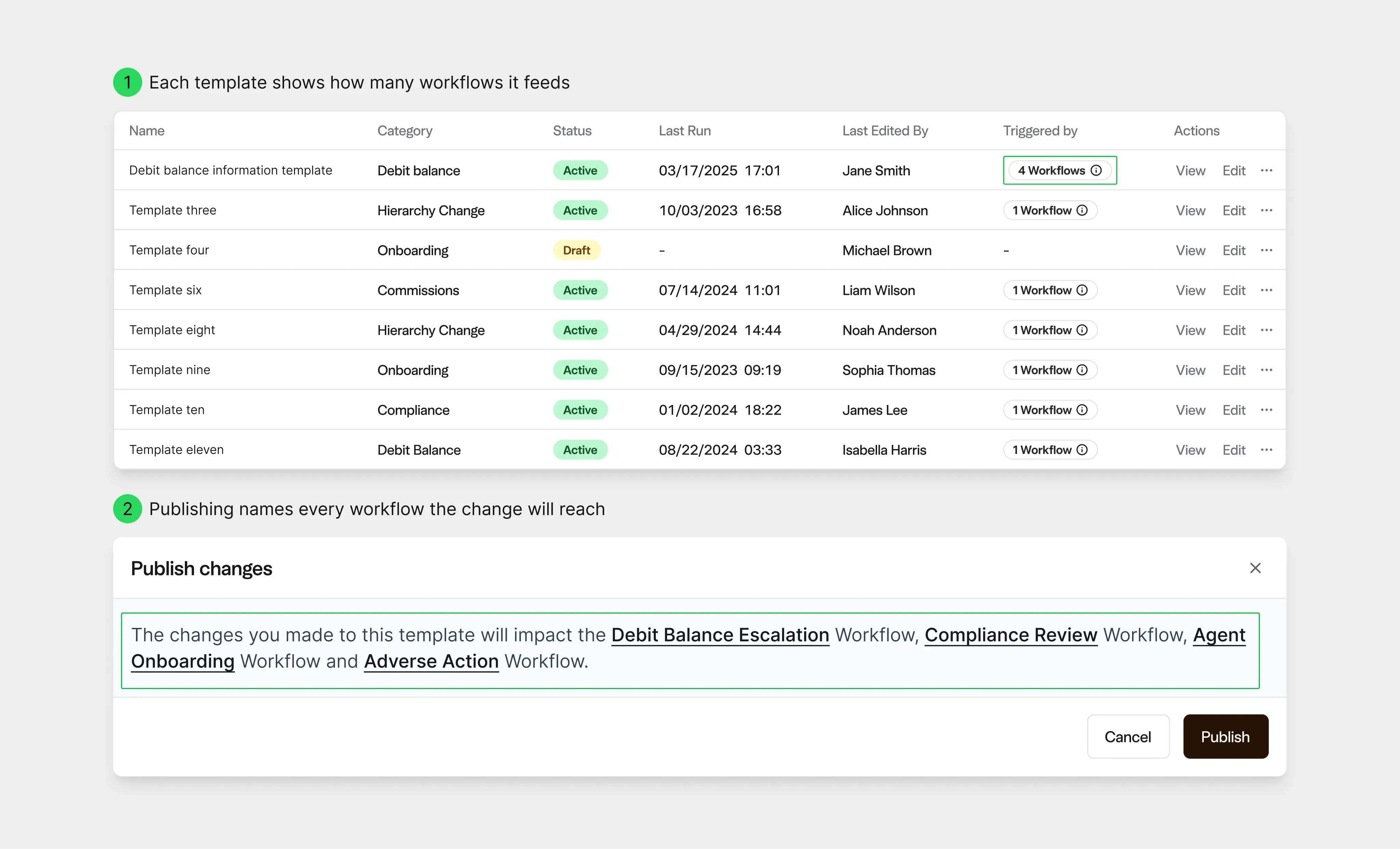
Template list showing how many workflows each template feeds, and a publish confirmation naming every affected workflow

Reach is shown twice. The list says how many workflows each template feeds, and publishing names every one of them before the change goes live.

03 / THE DECISION

Name the reason each message is sent

Designing how templates link to workflows surfaced a missing layer. A template fills in details such as a producer’s name or licence date, and those details come from the workflow that sends it. Linked straight to workflows, the system had no dependable way to know which details applied, so an email could reach a producer with empty fields.

Two alternatives were drawn first: linking templates directly to workflows, and a stricter rule of one template per workflow. Both treated the link as a simple picker. It is really a decision about whether the data in the email will be right.

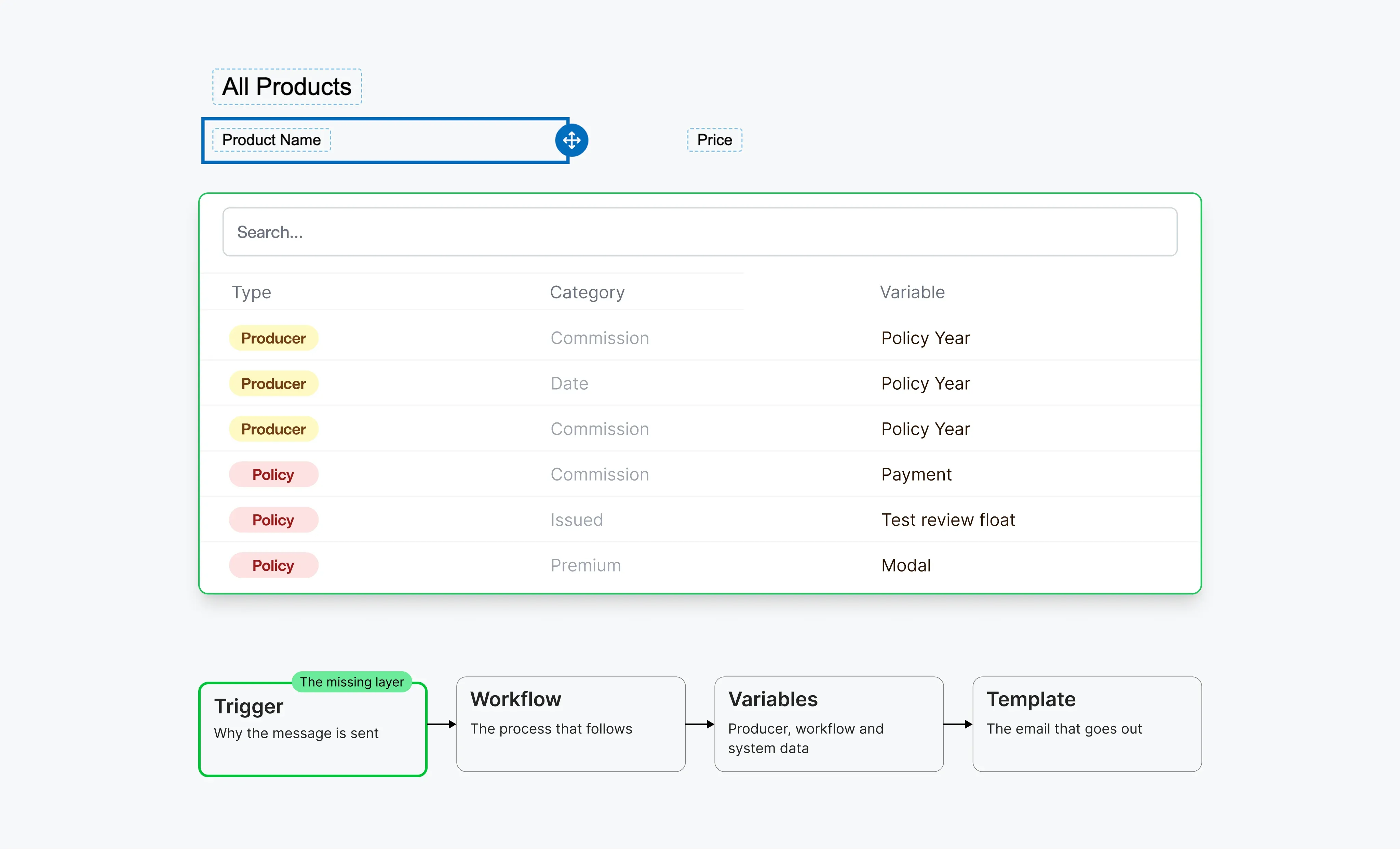
The answer was the trigger: the event that explains why a message is sent, such as a licence nearing expiry. The trigger decides which workflow runs, and the workflow decides which details the template can use. Chestnut’s data model already kept triggers and workflows apart. Drawing the screen gave that separation a purpose.

THE PRODUCT DECISION

The trigger became the intent behind every message, and the right details followed from it.

We shaped it as information, not as a lock. The editor shows which workflow context a template belongs to, and its variable picker groups details by source and category, such as producer or policy data. When no workflow is selected, it says so plainly instead of offering details that would come out blank.

Template editor variable picker above the trigger, workflow, variables and template chain

The editor offers only the details the chosen context can fill. Below it, the model in one line: trigger, workflow, variables, template.

04 / MAKING IT HOLD

The work around the editor

The email editor itself is a third-party tool, and it would have been easy to treat it as the main design surface. The more important work sat around it, in the checks that decide whether a change is safe.

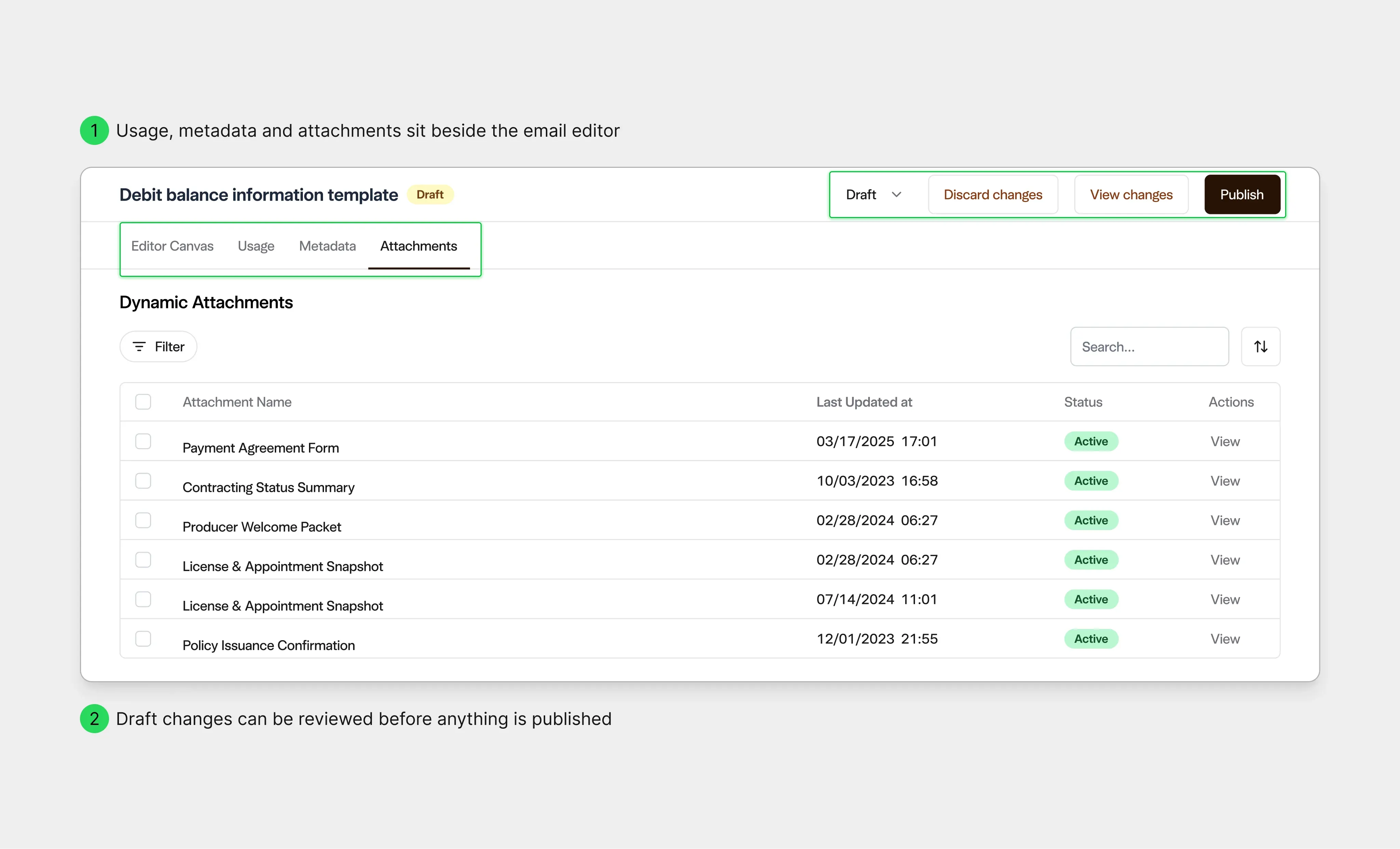
Before editing, a Usage view lists every workflow that depends on the template, with its status. It began as an analytics table. The columns about runs and success rates were removed, because its real job is to be a safety check. Before publishing, a confirmation names each affected workflow. If the template’s details no longer match what a workflow provides, publishing is blocked and the mismatched details are listed. Archived workflows are flagged instead of quietly hidden.

The same care went into what travels with the email. Dynamic attachments, such as a welcome packet or an appointment snapshot, have their fields mapped to the same details as the template. On a producer’s profile, an operations user can see every message sent to or about that producer and open a read-only copy of the exact email that went out.

Template screen with Usage, Metadata and Attachments tabs beside the editor, draft actions, and a list of dynamic attachments

What decides whether a change is safe sits next to the editor: where the template is used, what is attached to it, and what has changed in the draft.

05 / THE EXPENSIVE NUMBER

The same principle, where money moves

Bonuses and holds raised the same question in a harder form, because the consequence is money. A bonus is configured once, then pays out against live policy data for months. That gives it two lives, and the page now follows them. In draft, setup is the page and Publish leads. Once live, payouts come first and setup sits behind a single button. We checked this against the product before committing: reports stay empty until a bonus is live, and most setup cannot change afterwards.

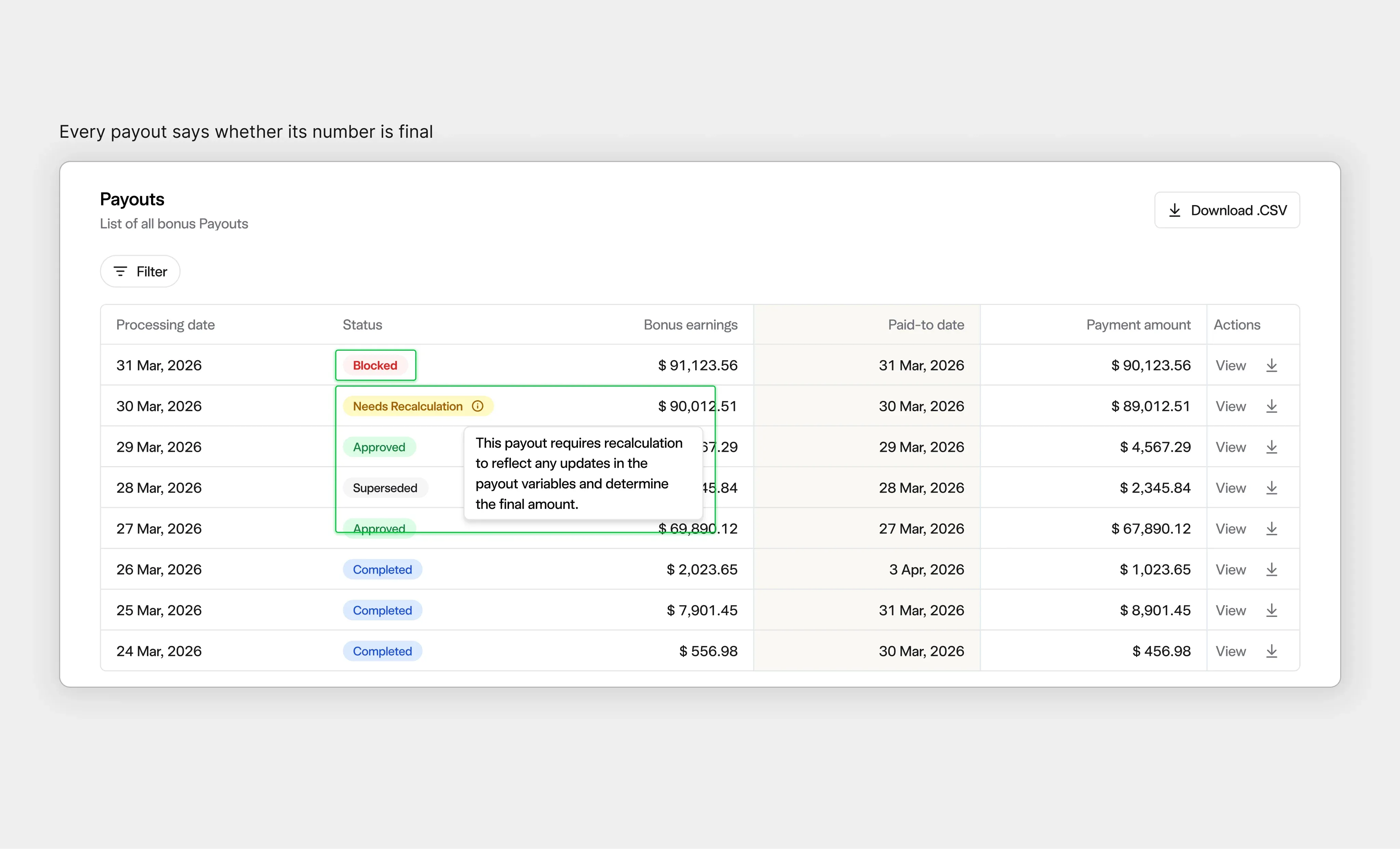
Payout figures needed the same honesty. A payout can change when a policy, plan setting or override changes, and recalculating it on demand is costly. Instead of presenting every figure as settled, each payout says where it stands: Needs Recalculation when an input has changed, Blocked when an earlier payout is still awaiting approval. Overrides, where an operator sets an amount by hand, require a reason and leave an audit trail.

Payout table with Blocked and Needs Recalculation statuses and an explanatory tooltip

A reviewer approving payouts can see whether each figure is final, waiting on an earlier approval, or due to be recalculated.

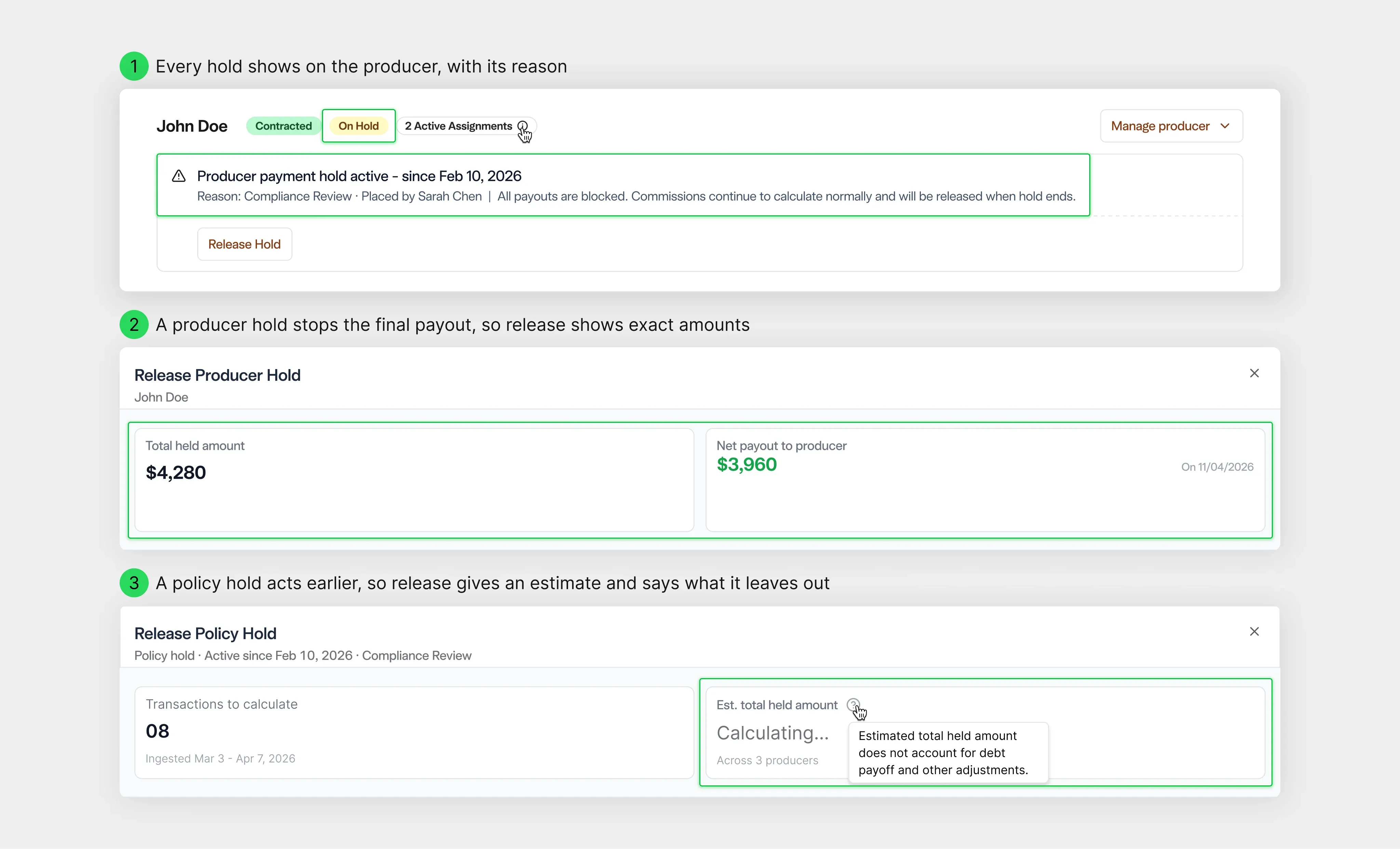
Holds follow the same logic. Chestnut has more than one kind, and they act at different points. A producer hold stops the final payout, so releasing it can show exact amounts. A policy hold stops earnings much earlier, and the exact figure after debt repayment is costly to calculate across a producer hierarchy. We kept them as separate flows instead of forcing one pattern on both.

The policy release opens straight away, calculates when needed, and says plainly that its estimate excludes debt payoff. Both releases ask what should happen to the held funds before anything is confirmed.

Producer hold banner, an exact producer hold release, and a policy hold estimate that states what it excludes

Two kinds of hold, two kinds of number: exact amounts where the figure is known, and an estimate that states what it leaves out where it is not.

06 / WHERE IT STANDS

Designed with the team, partly built by us

Because we worked inside Chestnut’s codebase, design and build were rarely separate steps. We implemented the bonus designs directly, built part of the communications front end ourselves, and reviewed built features against the designs as they landed.

Building still found states that a fully annotated design file had not covered, and they were added as they appeared. That is the case for keeping design close to the build: specifying finds fewer states than designing, and designing finds fewer than building.

The engagement concluded in August 2026. This case shows the product decisions and how they were built, not usage or business results.

WHAT THIS PROVES

In financial workflow software, trust comes from showing the consequence before the commitment.

Simple rules are worth keeping. What makes them safe is a product that shows how far one action reaches, blocks what would break, and says plainly when a number is not final yet.