The craft was in deciding what to keep. Existing users had built fast habits on the interface, so the modernised suite had to feel current to prospects and familiar to customers at once.
As a member of Benchmark's technical leadership put it: "For established users, familiarity and consistency are important parts of efficient workflows."
Related Tcules services: Product Modernisation, Design Engineering, and Design Systems.
What prospects and existing customers each needed from the modernised suite
Prospective customers judged the suite against what enterprise software looks like now. Existing customers judged it against what they already knew how to do. Both judgements were fair, and they pulled in opposite directions.
An established suite has to keep running while it is redesigned. The work started at the shared component layer, where one choice affects every application. It then moved into one high-use feature, where those choices could be tested against real work. There were four steps:
- Stabilise. Fix the reusable components and the conditions each one has to handle.
- Apply. Assemble those foundations inside a real product workflow.
- Evaluate. Tell visual opportunities apart from opportunities in how the interaction works.
- Refine. Put investment where the research says the product and its users gain most.
The redesign reached search, controls and navigation as well as appearance, which gave the team a way to improve how people worked across the suite.
Scope selector design: the control that decides which data people see
The feature chosen for that test was the scope selector. It is the control where a person tells the product which part of their organisation they are working in. Every application in the suite depends on it.
A mistake is easy to miss and expensive. Someone who selects the wrong scope sees the wrong data, presented confidently.
Three things were unclear in the existing control:
- Search. The boundary of a search was unclear, and searching and filtering looked alike, so a person could not always tell what a result set covered.
- Archive controls. The same control behaved differently in different areas of the suite.
- Custom group viewing. People using the mode were unsure what it was for.
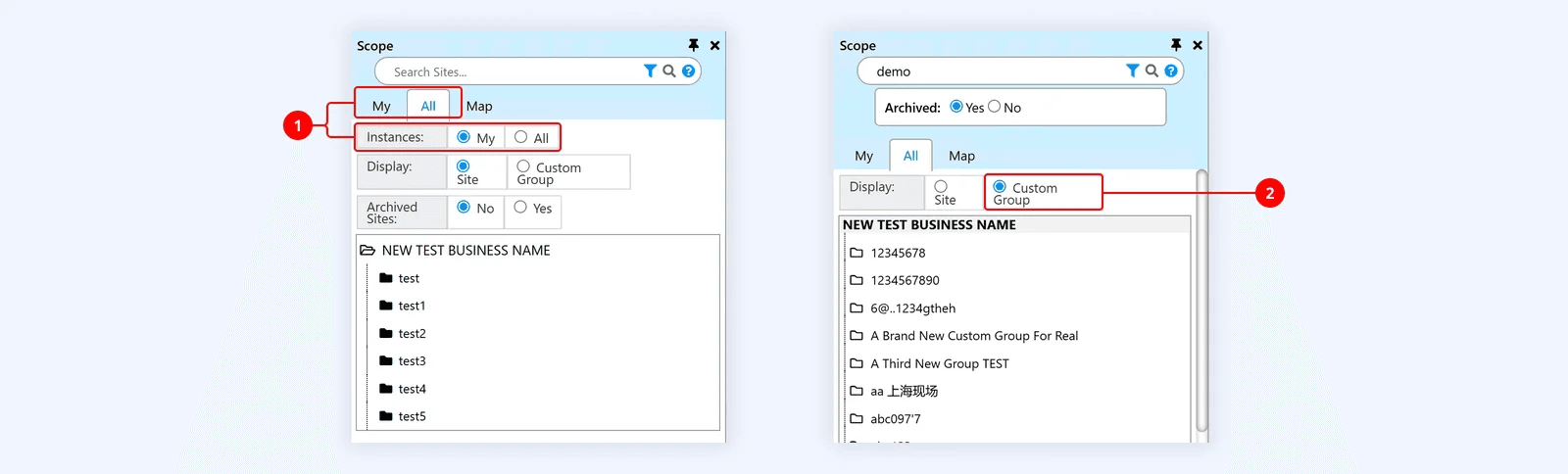
Figure 1. Legacy Scope Selector, “All” view
- Opportunity to more clearly distinguish navigation and filtering
- Opportunity to clarify the role of the Custom Group viewing mode
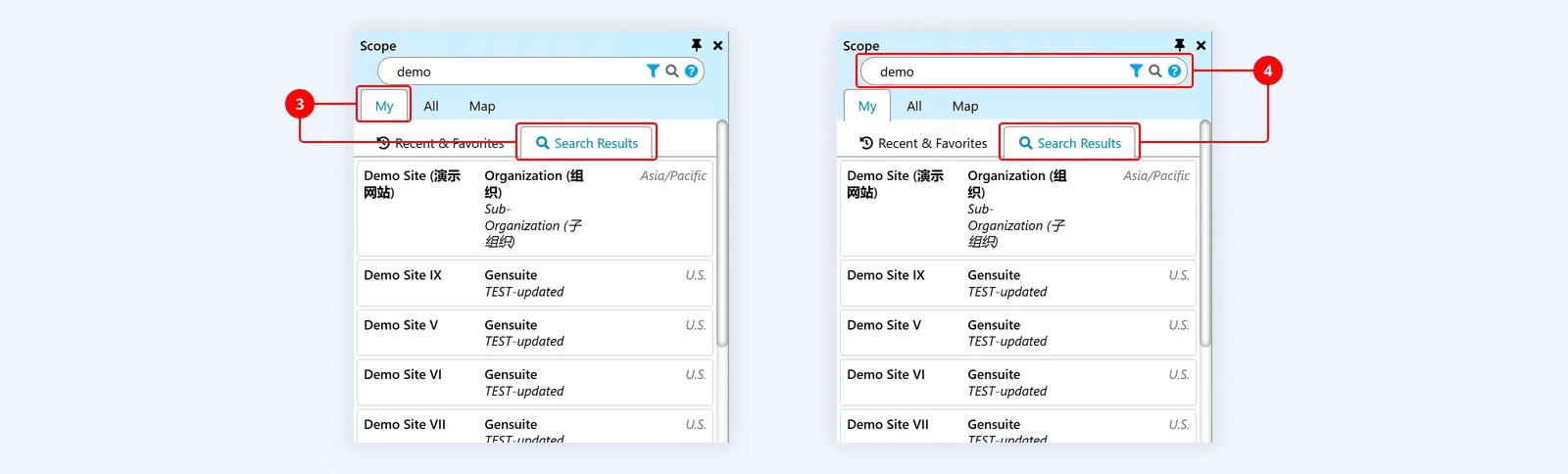
Figure 2. Legacy Scope Selector, “My” view
- Opportunity to more clearly distinguish Search Results from the "My" view
- Search behaviour varies by viewing mode
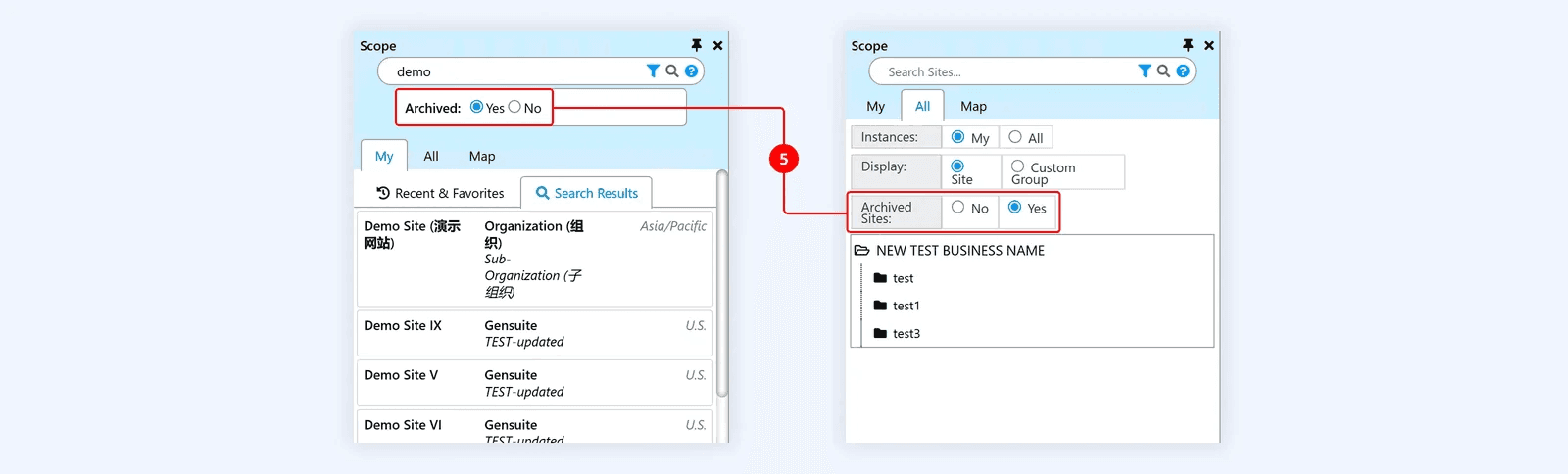
Figure 3. Legacy Scope Selector, “Search Results” on left, “All” view on right
- Opportunity to unify Archived Sites controls and behaviour
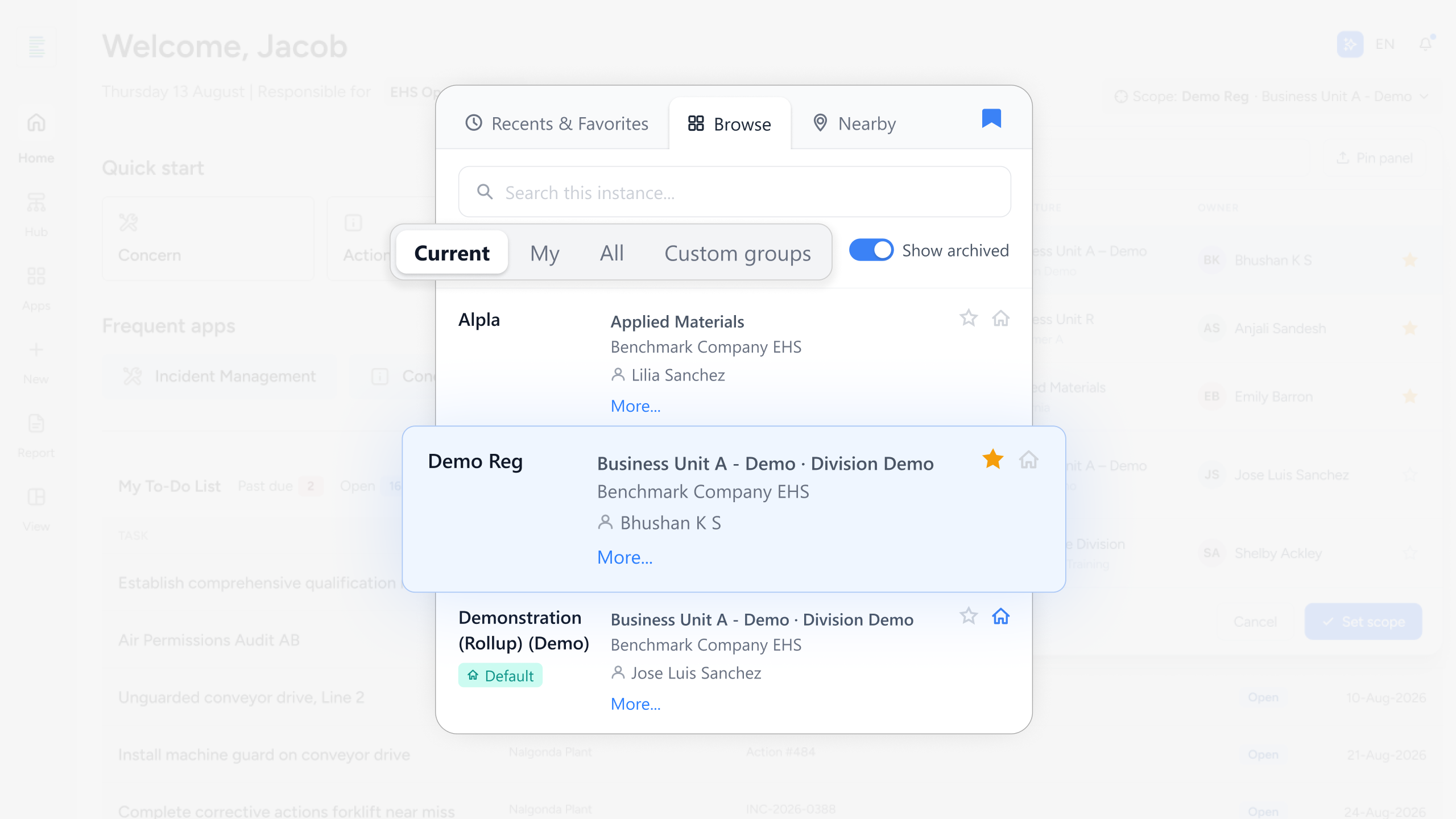
Three views for three needs: Browse, Recents and Favourites, Nearby
The redesigned selector stopped treating scope selection as one task. It split three different needs into three views, and each view states its own search boundary:
- Browse, for moving through the organisational hierarchy and choosing a scope deliberately.
- Recents and Favourites, for returning straight to the areas a person works in every day.
- Nearby, for the field case, where location is a better way to find the right site than hierarchy is.
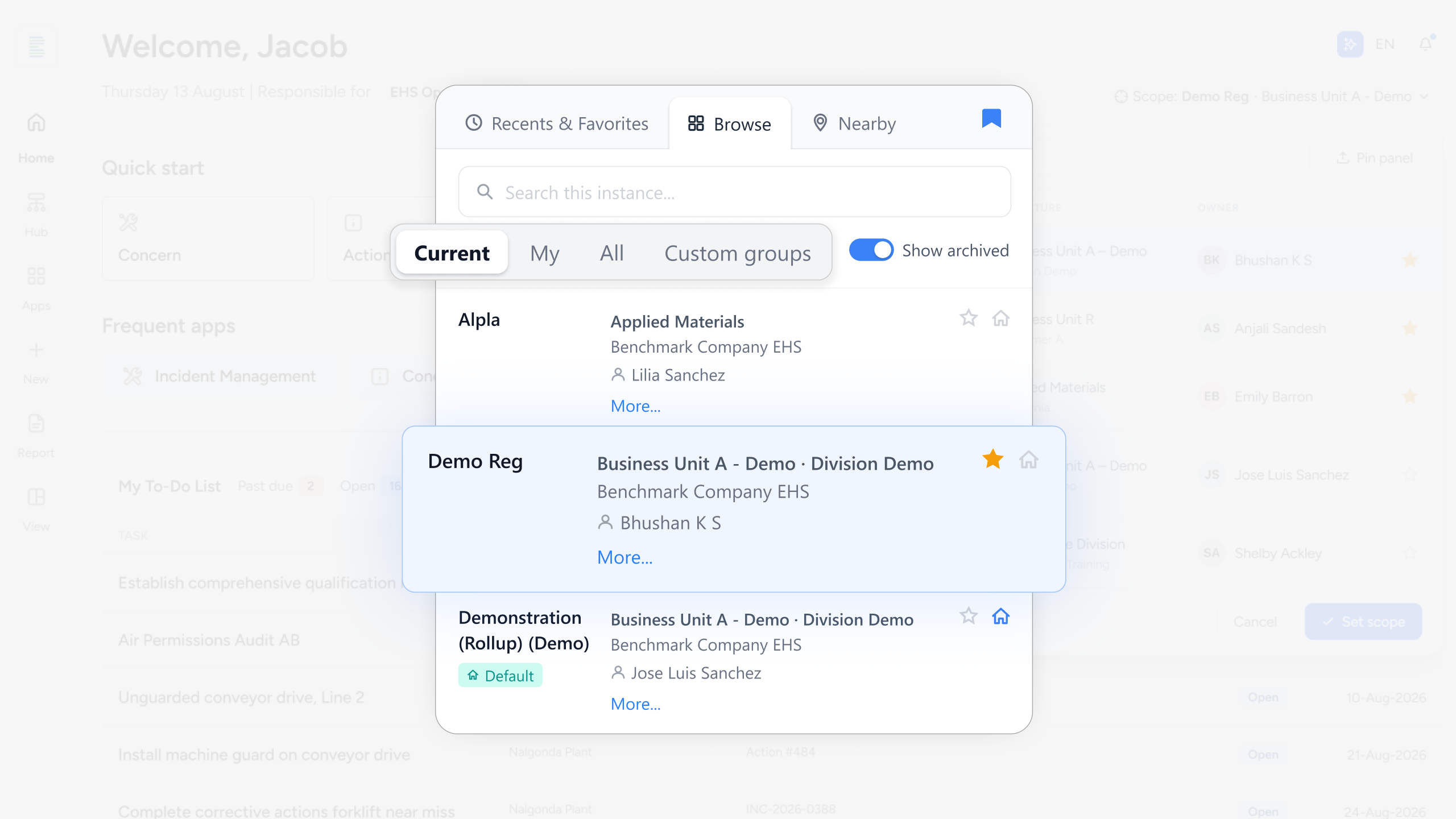
Figure 4. Redesigned Scope Selector
- Simplified navigation with clearer labels for each user need
- Distinct views for Browse, Recents and Favourites, and Nearby
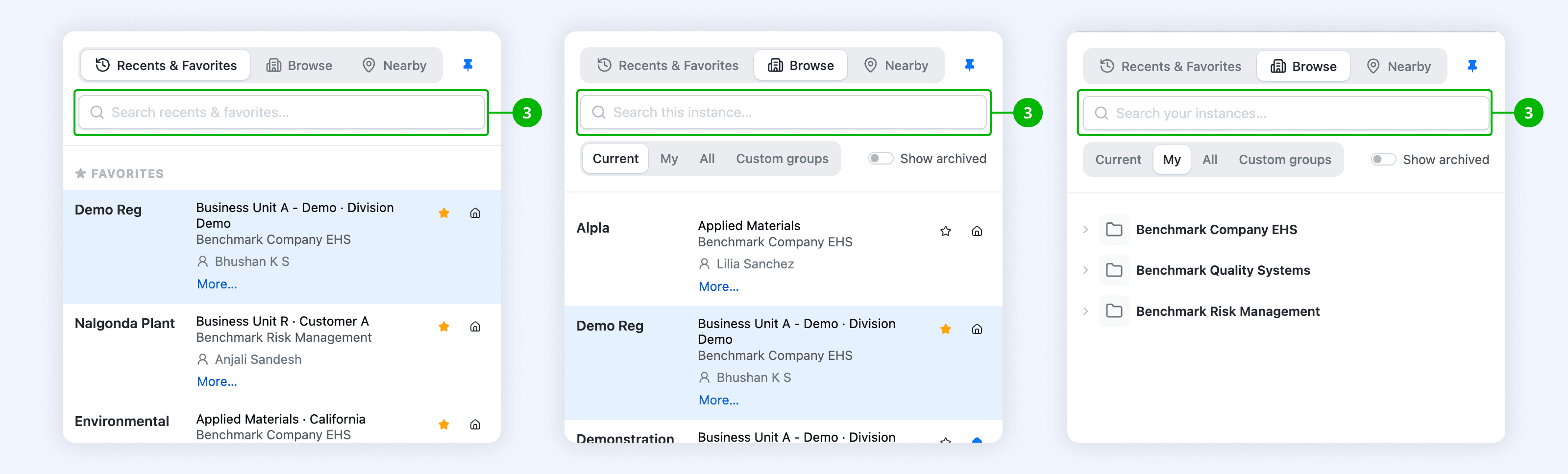
Figure 5. Redesigned Scope Selector
- Search behaviour appropriate to each viewing mode
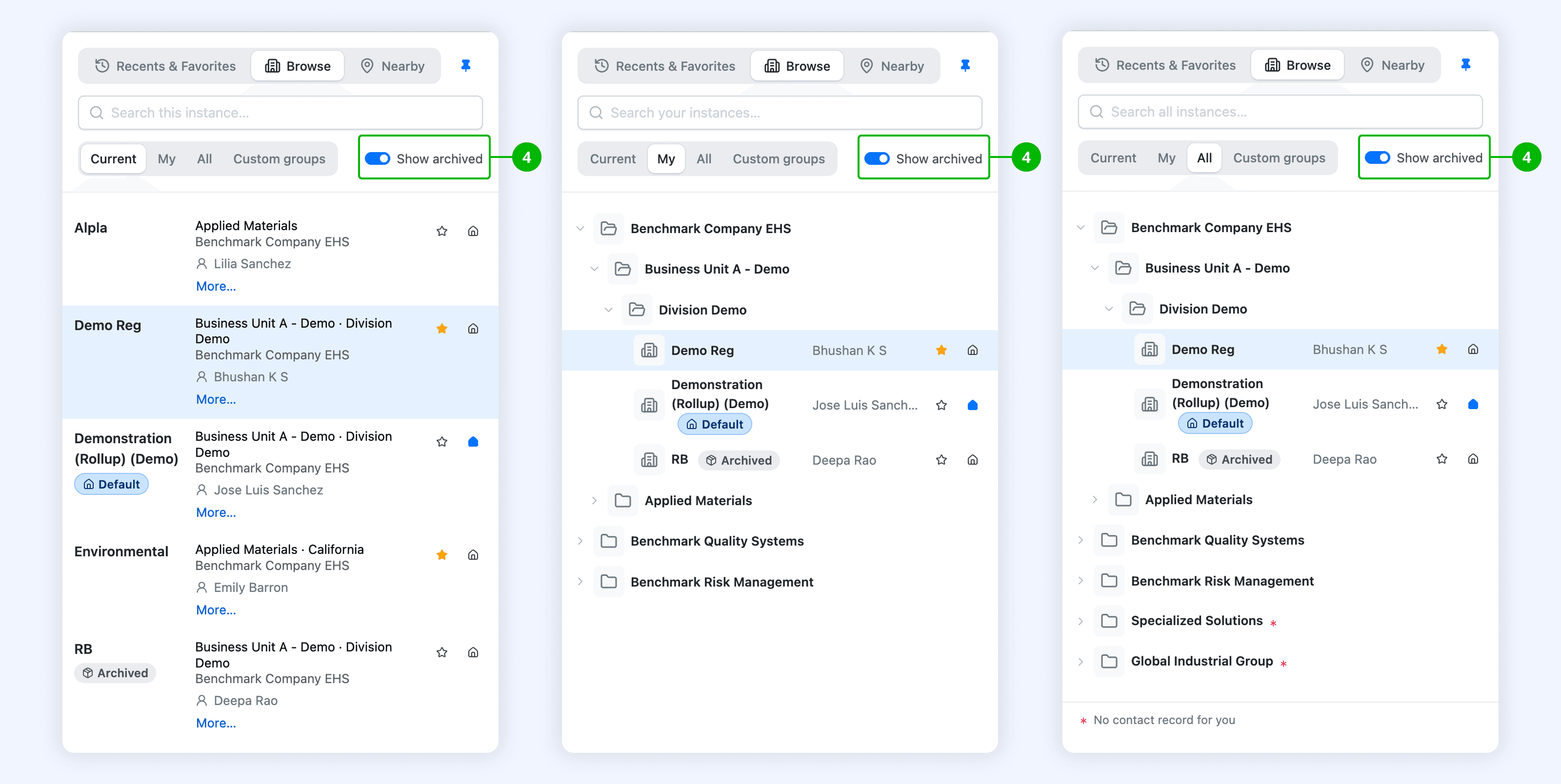
Figure 6. Redesigned Scope Selector
- Unified Archived Sites control and behaviour
The third view shows what the work was for. Nearby answers a different question: how a person finds their place in a large organisation. That answer only appears when modernisation is treated as an interaction problem.
Shared interface patterns, prototyped in code for Benchmark's engineers
Tcules built the direction as working prototypes in HTML, CSS and JavaScript. That did two things. The design's behaviour survived, because the prototype acted the way the design intended. And feasibility entered the conversation while the choice was still open, because engineers could review the real thing.
A Benchmark engineering stakeholder reviewing the work asked: "I was curious if you use an external library for drag and drop because Bootstrap 5 doesn't natively support it."
The prototype put that implementation question in front of the team during design review, while they could still act on it.
The attachments prototype went further. It covered organisation, nested folders, previews, reordering and what the system shows while any of that is happening.
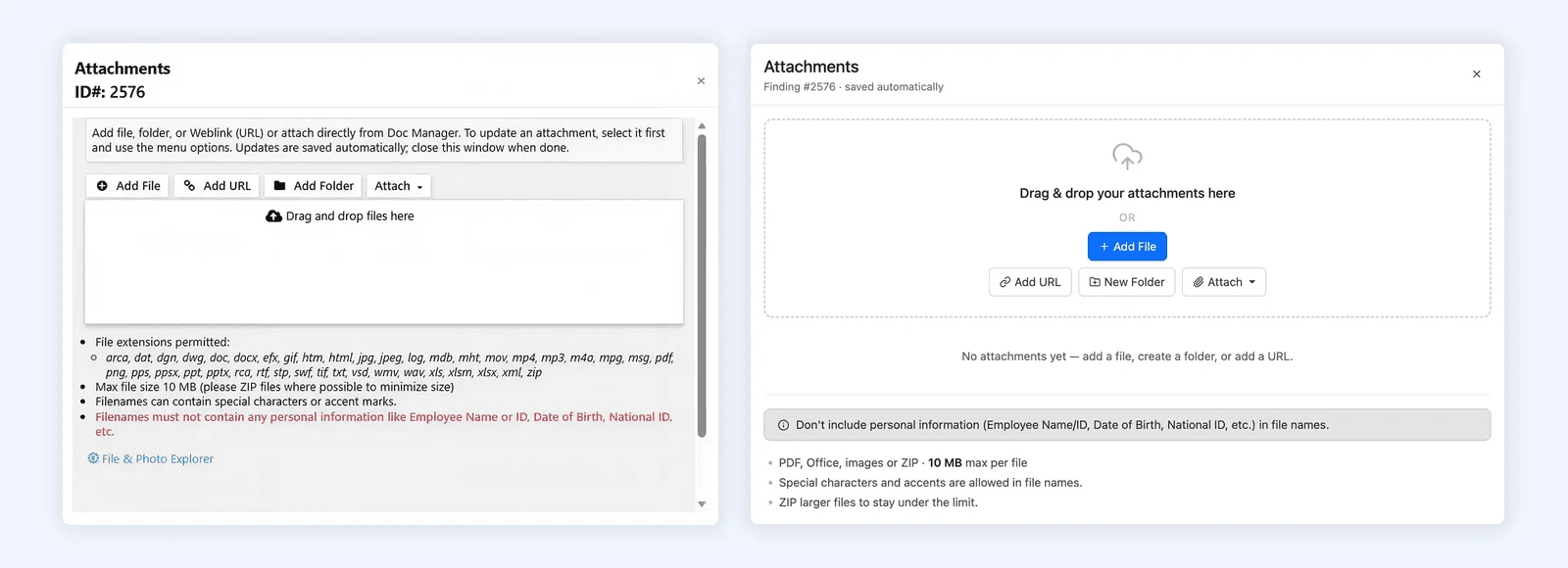
Figure 7. Legacy Attachments Modal on left, Redesigned Attachments Modal on right
What the coded prototypes confirmed for the suite
The prototypes let Benchmark's engineers check the design direction, and whether it could be built, before wider implementation. They produced a component direction for the Bootstrap 5.3 migration and confirmed the three-view approach to scope selection.
The scope selector gave familiar work a clearer structure, with a separate path for people finding a site by location.
The same sequence can carry the rest of the suite, one shared control at a time: prove the control in code, check it with engineers and against the habits customers rely on, then roll it out across the applications.
Enterprise suite modernisation: four jobs to separate before you start
Before committing to a modernisation, pull apart four things that get bundled together:
- a framework upgrade
- a visual refresh
- a change to how the product works
- a design-system programme
Each has different costs, different risks and different people who must agree. Working out which of the four the product needs protects the workflows your existing customers have already learned.
This reasoning is the core of Tcules' product modernisation work. Proving a direction in a running interface before production is design engineering, and the shared-component layer it started from is design systems.
Questions about the Benchmark Gensuite modernisation
What did Tcules do for Benchmark Gensuite?
Tcules developed a shared interface direction for Benchmark Gensuite's established environment, health, safety, sustainability and operational-risk suite, and redesigned its scope selector. We made coded prototypes of the shared patterns and a three-view selector ahead of customer release. Our work with Benchmark has continued since.
How do you modernise a software suite without making customers relearn it?
Start at the shared component layer, then test those choices inside one high-use feature against real work. For Benchmark Gensuite, that feature was the scope selector, which every application in the suite depends on. Coded prototypes let the team check each change against existing habits before wider implementation.
Why prototype enterprise software patterns in code?
A coded prototype behaves the way the design intends, and engineers can review the real thing. During design review, a Benchmark engineer asked whether drag and drop would need an external library with Bootstrap 5. The team could act on that question while the choice was still open.
What is the scope selector in Benchmark Gensuite?
It is the control where a person tells the product which part of their organisation they are working in. Choosing the wrong scope shows the wrong data, presented confidently. The redesign split it into three views: Browse, Recents and Favourites, and Nearby for finding a site by location.